Cheap Windows RDP Hosting in India & Noida6GB DDR4 ECC from ₹549/mo
VisiHost’s Windows RDP plans run in Noida, Delhi NCR. The entry plan costs ₹549/month for 2 Intel Xeon vCores, 6 GB RAM, 50 GB NVMe and full Administrator access on Windows Server 2022.
What does the ₹549 Noida RDP plan include?
The XS plan gives you your own Windows desktop. On 21 November, the INR checkout showed a ₹549 monthly base price plus a ₹10.98 gateway fee, bringing the amount payable to ₹559.98.
| Specification | Entry Plan (Intel Xeon XS RDP) |
|---|---|
| Monthly Price | ₹549 / mo (flat renewal) |
| Memory (RAM) | 6 GB DDR4 Registered ECC |
| Cost per GB RAM | ₹91.50 / GB |
| vCPU Allocation | 2 vCores (Intel Xeon Platinum 8269CY) |
| Storage | 50 GB Enterprise PCIe Gen4 NVMe |
| IPv4 Address | 1 Dedicated Static Indian IPv4 |
| Virtualization | 100% KVM (Intel VT-x, full isolation) |
| Operating system | Windows Server 2022 |
| Network Port | 1 Gbps Uplink (NIXI Peering) |
| Datacenter | Noida, Delhi NCR (Tier-3) |
| Payment Methods | UPI, RuPay, Net Banking, Debit/Credit |
Cheap Windows RDP Hosting Plans in India
Choose a Windows desktop in Noida by RAM, storage and monthly price. For a budget under ₹600, the XS plan includes 6 GB RAM and 50 GB NVMe. The S plan has 8 GB RAM and 80 GB NVMe for ₹649/month before fees.
Intel Xeon XS (RDP)
Intel Xeon S (RDP)
Intel Xeon M (RDP)
Intel Xeon L (RDP)
Intel Xeon XL (RDP)
Intel Xeon XXL (RDP)
Windows RDP prices in India
Advertised monthly plans checked on 21 November 2026. The provider links show the plan terms, stock and any payment fees.
| Provider and plan | Monthly base | RAM | Storage |
|---|---|---|---|
| HeavenCloud · India Budget | ₹390 | 2 GB | 15 GB SSD |
| ShoHost · monthly billing | ₹399 | 2 GB | 50 GB SSD |
| HexaCraft · RDP XS | ₹475 | 8 GB | 80 GB NVMe |
| VisiHost · Intel Xeon XS | ₹549 | 6 GB | 50 GB NVMe |
| Xenax Cloud · Speed RDP 1 | ₹649 | 4 GB | 40 GB SSD |
| Tabi Cloud · India Pane | ₹649 | 8 GB | 80 GB NVMe |
Check the billing period before comparing prices. ShoHost lists a separate three-year rate. HostAsia’s page title advertised ₹599, while its IN-RDP LITE plan card displayed ₹1,299/month for 4 GB RAM when checked.
Dedicated Admin RDP vs Cheap Shared RDP in India
When searching for cheap RDP India options, users often encounter two very different setups: low-cost shared RDP and dedicated KVM Windows RDP. Shared RDP servers pack 50 to 100 users onto one overloaded Windows session with zero administrator privileges, blocked software installations, and severe performance throttling whenever another user runs heavy scripts.
In contrast, VisiHost provides dedicated admin RDP servers in India running Microsoft Windows Server (2022 or 2019) with 100% KVM hardware isolation. You receive full Administrator rights, a dedicated static Indian IPv4 address, and guaranteed DDR4 ECC RAM and NVMe storage. Through Microsoft's Remote Desktop Protocol (RDP / MSTSC), you can securely run automated tasks 24/7 without multi-tenant interruptions.
How much RAM do you need for Windows RDP?
For a single desktop, start with the applications you keep open together. The 6 GB XS plan costs ₹549/month. The 8 GB S costs ₹649/month and gives a browser or trading terminal another 2 GB of memory. Open Task Manager during your busiest session. If memory stays full while CPU usage is low, compare the next RAM tier.
Why KVM Hardware Virtualization is Required for Windows Server
Unlike Linux containers (LXC/OpenVZ) that share a common kernel, Microsoft Windows Server requires full hardware-assisted virtualization (Intel VT-x / AMD-V) to execute its own kernel, memory management units, and hardware security layers.
At VisiHost, 100% dedicated KVM virtualization is included standard on every plan at zero extra charge. You get dedicated vCPUs, guaranteed ECC memory allocation, and isolated virtual disks.
Intel Xeon Platinum, DDR4 ECC & Gen4 NVMe Architecture
Why enterprise hardware architecture matters for responsive Windows Remote Desktop performance and 24/7 workload stability.
Intel Xeon Platinum 8269CY Processors
VisiHost RDP servers are powered by enterprise Intel Xeon Platinum 8269CY processors featuring 26 cores and 52 threads with all-core Turbo speeds up to 3.80 GHz. This enterprise CPU platform delivers sustained computing power without throttling, ensuring responsive UI rendering and rapid script execution.
DDR4 ECC Memory for Zero-Downtime Stability
Every VisiHost RDP plan is equipped with DDR4 ECC (Error-Correcting Code) memory. ECC RAM continuously monitors, detects, and corrects single-bit memory corruptions, preventing blue-screen errors (BSODs) and silent data corruption on servers running 24/7 for months at a time.
PCIe Gen4 Enterprise NVMe SSD Storage
Unlike hosts that use legacy mechanical HDDs or SATA SSDs with 500 MB/s caps, VisiHost uses PCIe Gen4 NVMe solid-state arrays in hardware RAID. Enjoy transfer speeds exceeding 3,500 MB/s and 50,000+ random IOPS for instantaneous file unpacking and rapid application startup.
1 Gbps High-Speed Network Port & DDoS Mitigation
All RDP servers include a dedicated 1 Gbps network uplink connected to tier-1 Indian internet exchanges. Automated hardware DDoS mitigation inspects and neutralizes Layer 3, Layer 4, and Layer 7 volumetric attacks before malicious packets can degrade your active session.
Can I use a Noida RDP server from elsewhere in India?
Yes. Your Windows desktop runs in Noida, Delhi NCR, and you can connect from Mumbai, Bengaluru or another Indian city. For interactive work, the round-trip time between your connection and the server affects how quickly a click appears on screen. For an application that talks to a broker or database, also consider the route from the server to that service.
VisiHost’s network tests from its Noida VPS node recorded 2.4–5.6 ms on the Delhi NCR route, 20.8–25.2 ms on the Mumbai route and 26.8–32.1 ms on the Chennai route. These are network ping measurements. Your ISP, Wi-Fi and desktop workload affect your own session. See the city measurements and test method.
Full Admin RDP Privileges vs Restricted Shared RDP
Every VisiHost admin RDP server is provisioned with 100% full Administrator credentials. You are not a restricted user sharing a machine with strangers. You have complete autonomy to:
- ✓Install any software, executable (.exe), or driver needed for your workflow.
- ✓Configure Windows Firewall, custom port forwarding, and network adapters.
- ✓Create sub-users, configure group policies, and manage task scheduler routines.
- ✓Run background automation scripts 24/7 without being forcibly logged out.
Popular Use Cases for Windows RDP in India
Discover how developers, traders, businesses, and remote workers utilize VisiHost RDP servers across India.
Forex Trading & MetaTrader (MT4 / MT5 / EAs)
Keep automated trading bots, Expert Advisors (EAs), and TradingView charts operating 24 hours a day with zero interruption from local PC power cuts or Wi-Fi drops. Static Indian IPv4 ensures consistent broker connectivity.
24/7 Web Browsing & Automation Bots
Run Chromium-based browsers (Chrome, Brave, AdsPower), Puppeteer, Selenium, or Python scraping scripts round-the-clock on unthrottled 1 Gbps Indian bandwidth without draining your personal PC battery.
Tally Prime & Business ERP Accounting
Host Tally Prime, Busy, and enterprise accounting software in a centralized, secure environment accessible by your chartered accountant, branch offices, and remote staff simultaneously via MSTSC.
Remote Windows Workstation from Any Device
Transform any lightweight Chromebook, low-spec laptop, iPad, or Android phone into a full-featured multi-core Windows desktop accessible through Microsoft Remote Desktop.
High-Speed File Transfer & Archiving
Download and upload massive database dumps, software archives, and large backup files over 1 Gbps unthrottled network ports directly to high-speed PCIe Gen4 NVMe arrays.
Remote Development & Software Testing
Compile code, test Windows desktop software, run staging environments, and debug scripts with 100% full Administrator rights without modifying your local computer setup.
How to Connect to Your India Windows RDP Server via MSTSC
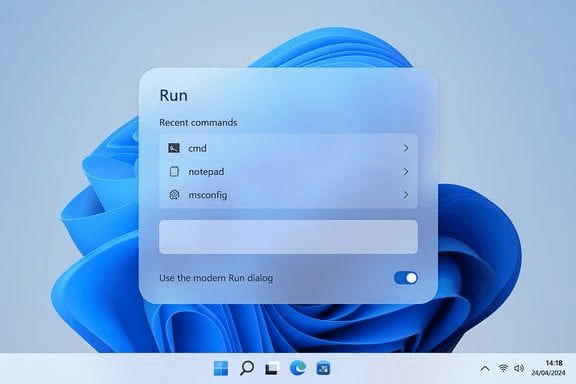
From a Windows PC, open Run with Windows + R. Enter mstsc to launch Remote Desktop Connection.
Buy RDP with Instant UPI
Choose your cheap Windows RDP plan (from ₹549 for 6GB RAM) and buy RDP in India using domestic UPI (Google Pay, PhonePe, Paytm). Credentials deploy immediately.
Open Remote Desktop
On Windows, press Win+R, type mstsc, and hit Enter. On Mac/Android/iOS, launch Microsoft Remote Desktop.
Enter Server IPv4
Paste your assigned static Indian IPv4 address into the Computer field and click Connect to initialize the handshake.
Log in as Administrator
Input Administrator and your password. Verify the remote computer identity before completing sign-in.
What customers say about VisiHost
Customers describe their experiences across VisiHost services.
“Truly top-tier hosting experience”
Truly one of the top hosting platforms I ever used and the owner and all staff are super nice and helping. Truly a great experience 🤍🤍
Frequently Asked Questions: Windows RDP in India
Authoritative answers regarding hardware, administrator access, network latency, and UPI payment options.
Explore Related India Hosting & Cloud Infrastructure
Enterprise KVM virtualization, high-speed gaming transit, and automated 24/7 bot hosting deployed in our Sector 62, Noida datacenter with direct NIXI and tier-1 Indian fiber peering.
Cloud & VPS Servers
- Noida & India VPS Hosting6 GB RAM, 2 vCores from ₹389/mo in Sector 62
- VPS Hardware BenchmarksSysbench CPU, FIO 4K IOPS, and pan-India latency lab
- Global Cloud VPSKVM virtual servers across multi-region datacenters
- Dedicated ServersBare metal AMD EPYC & Intel Xeon hardware nodes
Bot & Application Nodes
- Telegram Bot Hosting24/7 Python, Telebot & Pyrogram bot hosting
- Discord Bot HostingNode.js & discord.py nodes with Pterodactyl panel
- Lavalink Audio NodesLow-latency music bot streaming audio hypervisors
- Managed Database HostingMySQL, PostgreSQL & Redis cloud databases
Game Server Hosting
- Minecraft Server Hosting IndiaHigh-clock Ryzen 9 & Xeon nodes from ₹44/mo
- Minecraft Java HostingPaper, Purpur, Forge & Fabric modpack support
- Minecraft Bedrock HostingPocket Edition & cross-play GeyserMC servers
- Payment Methods & Domestic UPIGoogle Pay, PhonePe, Paytm and RuPay
Guides & Technical Docs
- How to Connect to RDP via MSTSCStep-by-step Windows, Mac, iOS & Android guide
- Keep Discord Bot Online 24/7Best practices for zero-downtime bot deployment
- Minecraft Server Setup GuideComplete walkthrough for server configuration
- About VisiHost InfrastructureTier-3 datacenter engineering & network peering